
Filing Your Petition · Chapter 17
I-907 Form Complete Guide: Field-by-Field Instructions for EB1A/EB2 NIW Self-Petitioners (2026)
Table of Contents
Introduction
Form I-907, Request for Premium Processing Service is the one-page request that upgrades your already-eligible I-140 to premium processing — committing USCIS to act within 15 business days (EB1A) or 45 business days (EB2 NIW).
It's a short form, but a few fields confuse self-petitioners every time. This guide walks through it part by part with a filled sample. When you're ready to submit, see How to File I-907 Online; for whether premium processing is worth it, see Premium Processing Strategy.
Common I-907 Mistakes to Avoid
- Getting the Receipt Number field wrong (Part 2, Item 2) — the single most common error. See the rule below.
- Checking the wrong box in Item 8 — as a self-petitioner you are the petitioner, not an "applicant" or an attorney.
- Wrong classification code in Part 2, Item 3 (E11 vs. E21).
- Forgetting to sign (Part 3) — an unsigned form is rejected.
Page 1 — Part 1: Information About the Person Filing This Request
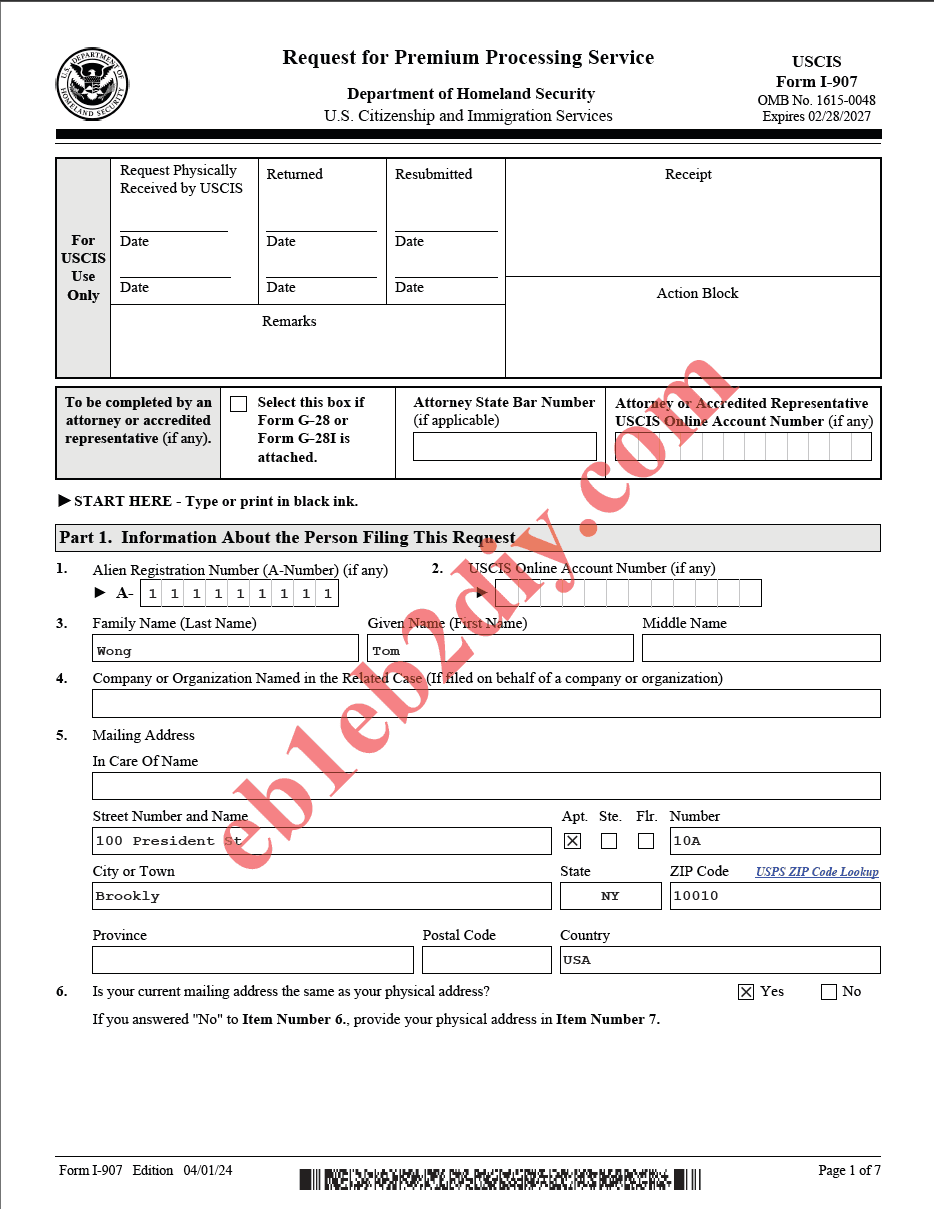
As an EB1A/EB2 NIW self-petitioner, you are the person filing this request (you filed your own I-140).
- Top "For USCIS Use Only" block — leave blank.
- "To be completed by an attorney or accredited representative" — leave blank if you're filing for yourself (no G-28).
- Item 1 — Alien Registration Number (A-Number) (if any): enter your A-Number if you have one; otherwise leave blank.
- Item 2 — USCIS Online Account Number (if any): the number from your myUSCIS account, if you have one.
- Item 3 — Your name: Family Name (Last), Given Name (First), Middle Name — exactly as on your I-140.
- Item 4 — Company or Organization Named in the Related Case: leave blank (self-petition; there is no sponsoring company).
- Item 5 — Mailing Address: your current mailing address.
- Item 6 — Is your mailing address the same as your physical address? Check Yes or No. If No, complete Item 7 on page 2.
Page 2 — Part 1 (continued) and Part 2: Information About the Request
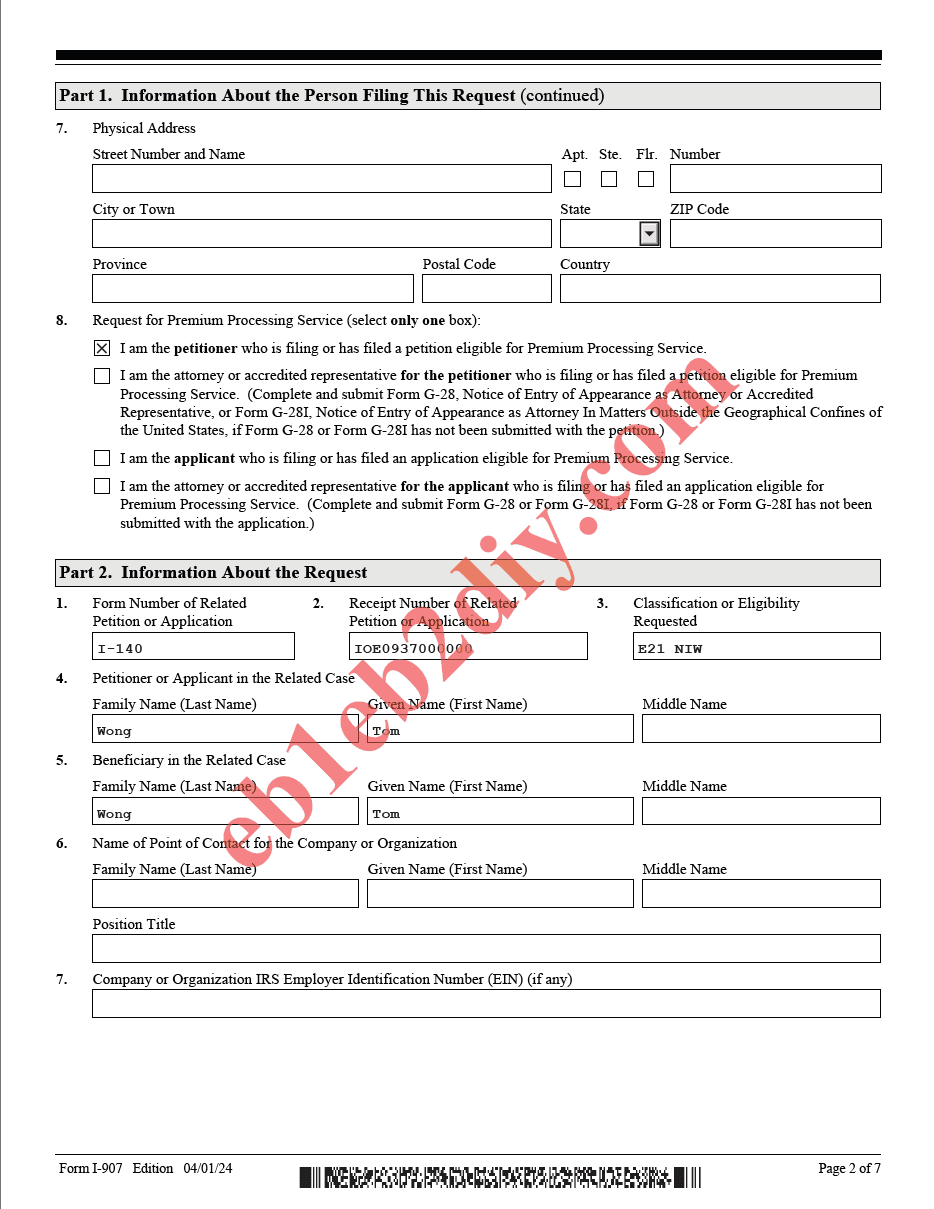
- Item 7 — Physical Address: only if you answered "No" to Item 6.
- Item 8 — Request for Premium Processing Service (select only one box): as a self-petitioner, check "I am the petitioner who is filing or has filed a petition eligible for Premium Processing Service." Do not check the attorney or "applicant" boxes.
Part 2 — the fields that matter most
- Item 1 — Form Number of Related Petition or Application:
I-140. - Item 2 — Receipt Number of Related Petition or Application: read the rule below carefully.
- Item 3 — Classification or Eligibility Requested: your I-140 classification code:
- E11 — EB1A (Alien of Extraordinary Ability)
- E21 — EB2 NIW (National Interest Waiver)
- Item 4 — Petitioner or Applicant in the Related Case: your name (you are the petitioner).
- Item 5 — Beneficiary in the Related Case: your name again — for a self-petition, the petitioner and the beneficiary are the same person.
- Items 6–7 — Point of Contact / Company EIN: leave blank (self-petition).
⚠️ Item 2 — Receipt Number: which to enter
- Filing online (after the I-140): You file the I-907 only after your I-140 has a receipt number, so enter that receipt number here (a 13-character number starting with
IOE…, e.g.IOE0937000000).- Filing on paper, concurrently with the I-140: You don't have a receipt number yet, so write "concurrent filing" in this field instead.
Page 3 — Part 2 (continued) and Part 3: Requester's Statement & Contact Information
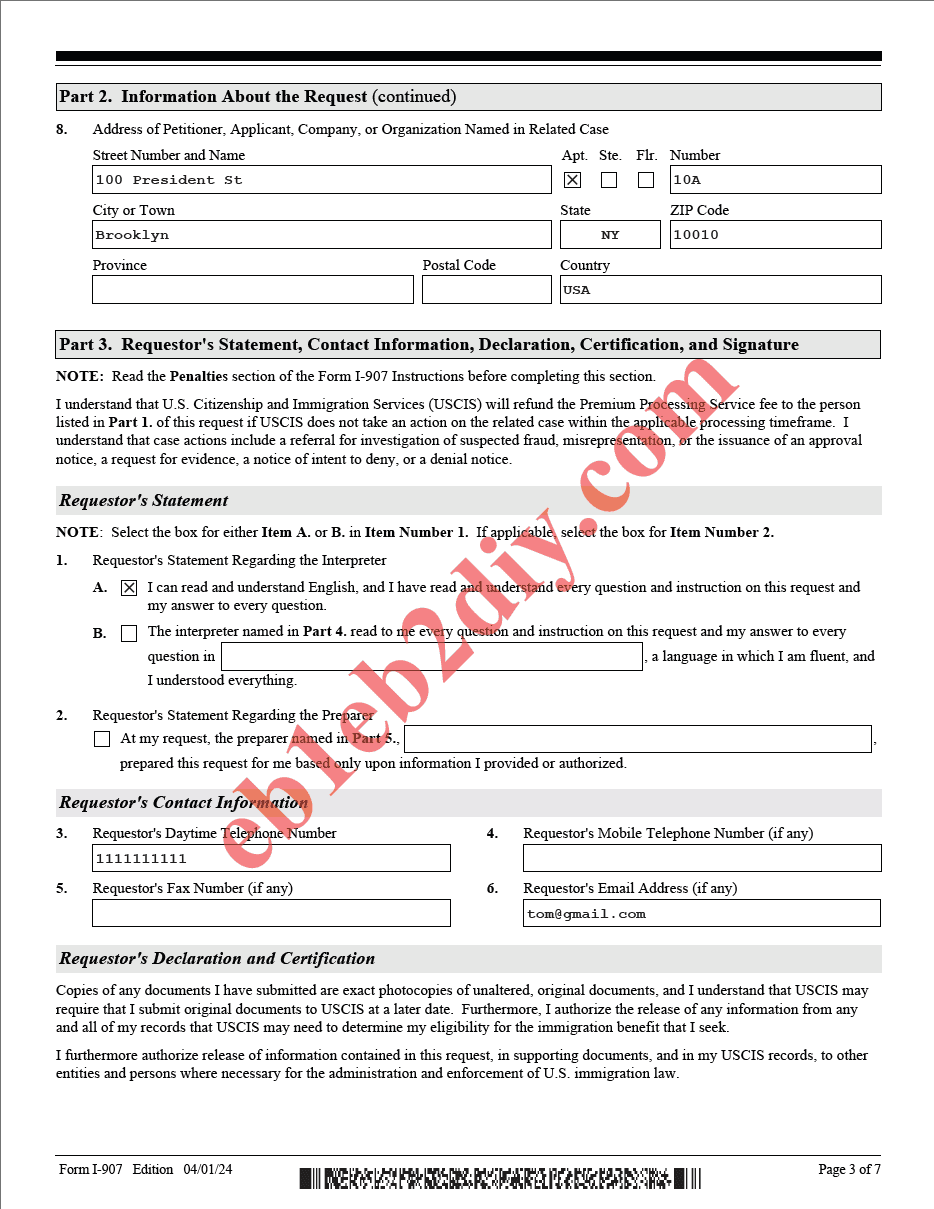
- Item 8 (Part 2) — Address of Petitioner/Applicant in the Related Case: your address as on the I-140.
- Part 3 — Requester's Statement: check Item 1.a ("I can read and understand English, and I have read and understand every question and instruction…") if that's true. Use the interpreter/preparer boxes only if someone helped you.
- Requester's Contact Information: your daytime phone, mobile phone (if any), and email.
Page 4 — Part 3 (continued): Signature (and Part 4 if applicable)
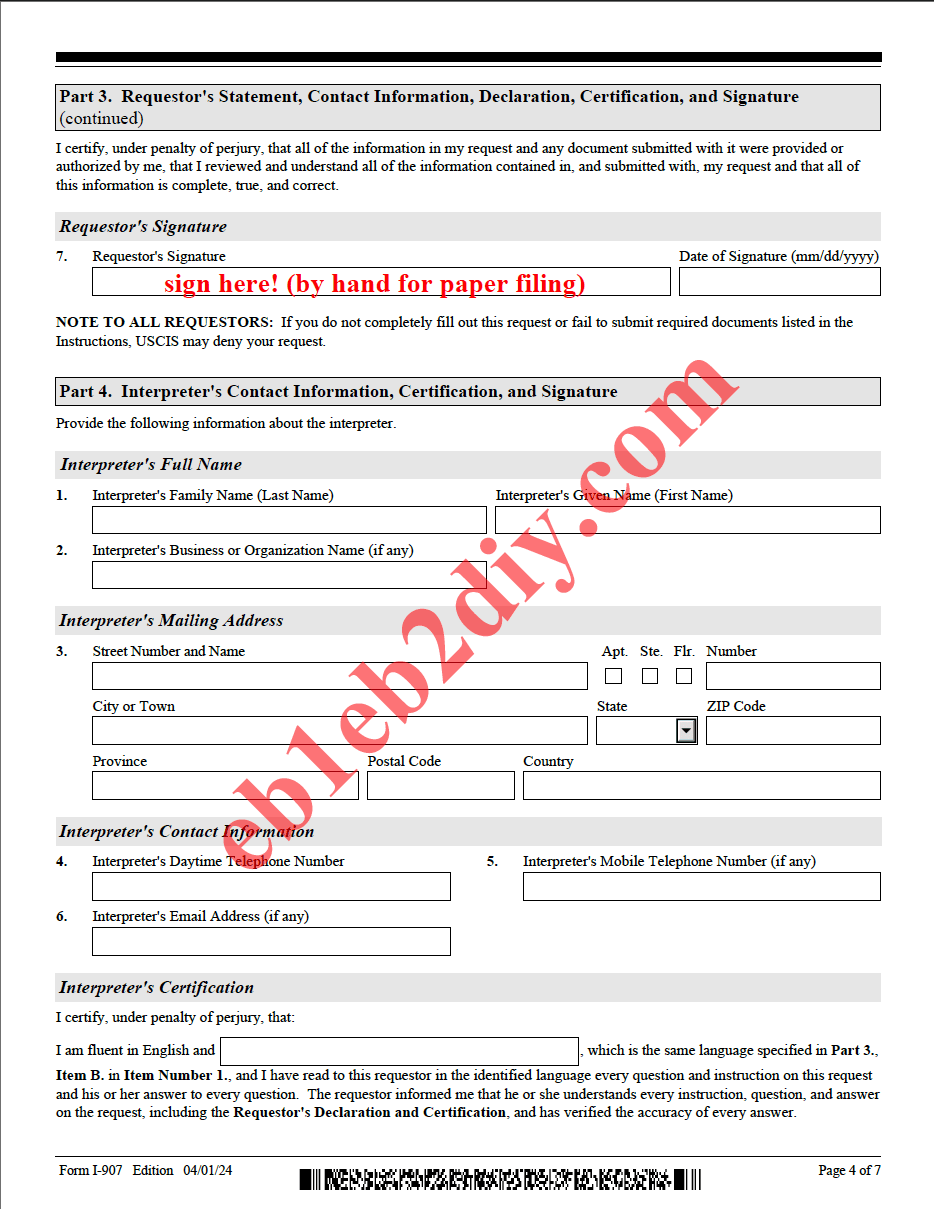
- Requester's Signature + Date: sign by hand if you are filing on paper. If you are filing online, you may e-sign during the online submission, or print, hand-sign, and scan the form — but it must be signed.
- Part 4 — Interpreter and the later preparer section: leave blank unless an interpreter or a preparer (other than you) was used.
Checklist
- ☐ Part 1: your name and mailing address; leave the attorney/company fields blank
- ☐ Item 8: check "I am the petitioner"
- ☐ Part 2 Item 1:
I-140 - ☐ Part 2 Item 2: receipt number (online) or "concurrent filing" (paper concurrent)
- ☐ Part 2 Item 3: E11 (EB1A) or E21 (EB2 NIW)
- ☐ Part 2 Items 4 & 5: your name as both petitioner and beneficiary
- ☐ Part 3: sign (by hand for paper; e-sign or scan for online)
Ready to submit? Once your I-907 is filled and signed, follow How to File I-907 Online to upload and pay — or include it with your paper I-140 for concurrent filing.
Based on Form I-907, Edition 04/01/24. As of June 2026. Always use the current edition from the official USCIS I-907 page.